> For the complete documentation index, see [llms.txt](https://365automate.gitbook.io/365automate-gantt/llms.txt). Markdown versions of documentation pages are available by appending `.md` to page URLs; this page is available as [Markdown](https://365automate.gitbook.io/365automate-gantt/baselines.md).
# Baselines
A baseline is a great way to visualise the progression of a project compared to the original planned schedule.
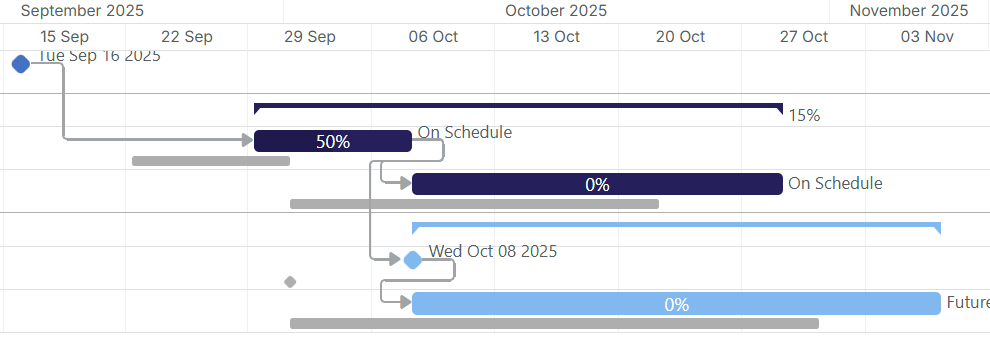
This involves taking a "snapshot" of your tasks which will then be displayed in small, gray colored task bars:
The baseline data is recorded in two additional Date fields in your SharePoint List.
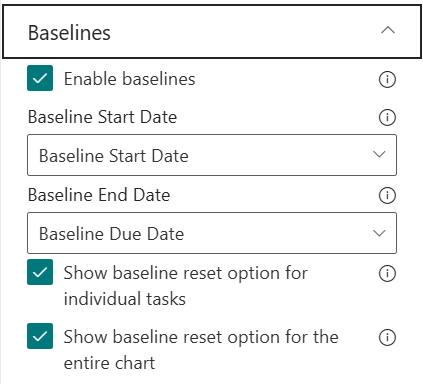
To configure baselines, edit your webpart and select the Baselines section:
The **Baseline Start Date** and **Baseline End Date** must be set to fields in your list before baselines can be used.
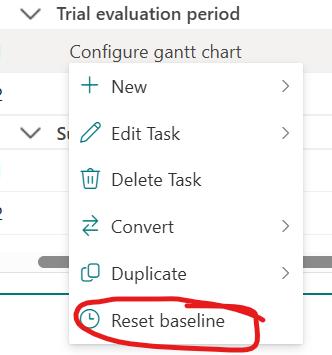
The option "**Show baseline reset option for individual tasks**" enables a right-click menu option:
Clicking this will reset the task baseline to match the task:
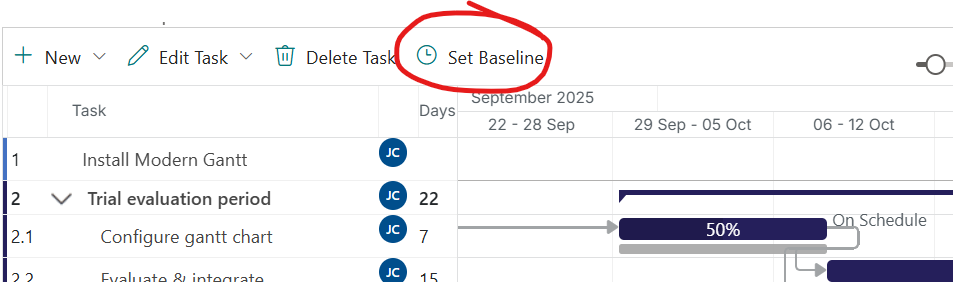
The option "**Show baseline reset option for the entire chart**" enables a command bar button:
{% hint style="info" %}
Clicking this button will update the baseline for the entire chart. Using this option is usually done during the initial project planning phase, after which this button can be hidden.
{% endhint %}
{% hint style="success" %}
If you're using baselines, why not [add an s-curve using our ListBurst Charts product](https://docs.listburst.app/advanced-chart-types/s-curve)?
{% endhint %}